NBomber Runner
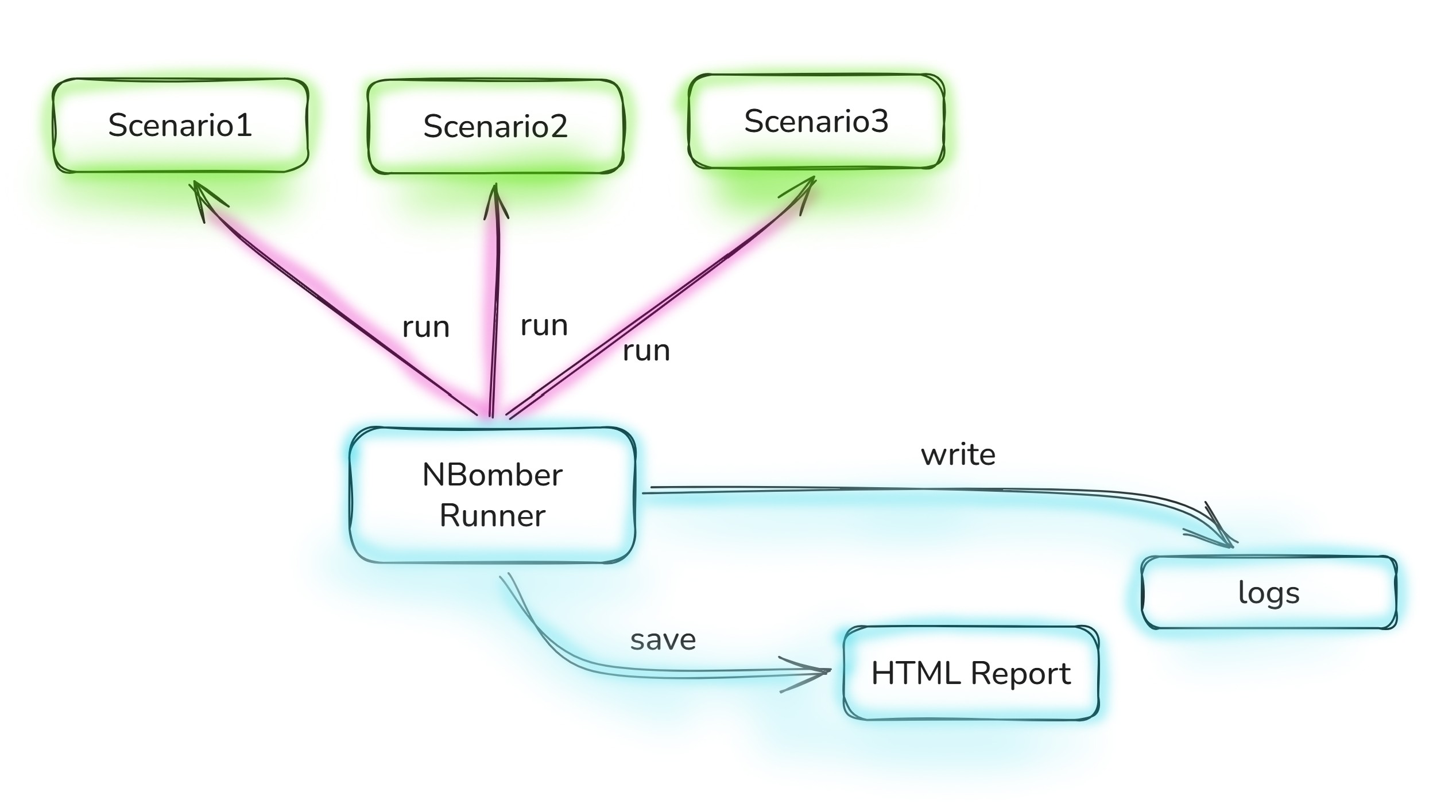
NBomberRunner is the main entry point for configuring and executing NBomber load tests. It provides a fluent API to register scenarios, configure test settings, and run the load test.
Register Scenarios
This method registers one or more scenarios to be executed during the load test.
public static NBomberContext RegisterScenarios(params ScenarioProps[] scenarios)
Example:
NBomberRunner
    .RegisterScenarios(scenario1, scenario2)
    .Run();
Run
This method starts the load test execution. It returns NodeStats containing the final statistics of the test run. Optionally, you can pass CLI arguments to override settings.
public NodeStats Run()
public NodeStats Run(string[] args)
Example:
// basic run
NBomberRunner
    .RegisterScenarios(scenario)
    .Run();

// run with CLI arguments
static void Main(string[] args)
{
    var scenario = Scenario.Create("scenario", ...);

    NBomberRunner
        .RegisterScenarios(scenario)
        .Run(args);
}
To get more info about CLI arguments please follow this link.
Load Config
This method loads a JSON Config file that overrides scenario settings such as LoadSimulations, WarmUpDuration, TargetScenarios, etc.
public NBomberContext LoadConfig(string path)
JSON Config can be loaded from:
- Local file path
- JSON content as a string
- HTTP URL
Example:
// from local file
NBomberRunner
    .RegisterScenarios(scenario)
    .LoadConfig("config.json")
    .Run();

// from URL
NBomberRunner
    .RegisterScenarios(scenario)
    .LoadConfig("https://my-test-host.com/config.json")
    .Run();

// from JSON content
NBomberRunner
    .RegisterScenarios(scenario)
    .LoadConfig("{ \"TestSuite\": \"my-suite\" }")
    .Run();
JSON Config file has higher priority over code configuration. For example, if you specified WarmUpDuration in both code and the config file, NBomber will take the value from the config file.
To get more info about JSON configuration please follow this link.
Load Infrastructure Config
This method loads a JSON infrastructure configuration file that overrides settings related to infrastructure: Logger(s), ReportingSink(s), and WorkerPlugin(s).
public NBomberContext LoadInfraConfig(string path)
Example:
NBomberRunner
    .RegisterScenarios(scenario)
    .LoadInfraConfig("infra-config.json")
    .Run();
To get more info about JSON infrastructure configuration please follow this link.
Test Suite and Test Name
These methods allow you to set the test suite and test name for the current load test session. They are useful for organizing and identifying test runs.
public NBomberContext WithTestSuite(string testSuite)
public NBomberContext WithTestName(string testName)
Example:
NBomberRunner
    .RegisterScenarios(scenario)
    .WithTestSuite("my test suite")
    .WithTestName("my test name")
    .Run();
You can also use JSON Config to override these settings.
{
  "TestSuite": "gitter.io",
  "TestName": "test_http_api"
}
License
This method loads the NBomber license key.
public NBomberContext WithLicense(string licenseKey)
Example:
NBomberRunner
    .RegisterScenarios(scenario)
    .WithLicense("Your_License_Key")
    .Run();
To get more info about licensing please follow this link.
Reporting
NBomberRunner provides several methods to configure report output.
WithReportFormats
Specifies which report formats should be generated.
public NBomberContext WithReportFormats(params ReportFormat[] reportFormats)
Example:
NBomberRunner
    .RegisterScenarios(scenario)
    .WithReportFormats(ReportFormat.Csv, ReportFormat.Html, ReportFormat.Md, ReportFormat.Txt)
    .Run();
WithReportFolder
Specifies the output folder for report files. Default value: reports.
public NBomberContext WithReportFolder(string reportFolder)
Example:
NBomberRunner
    .RegisterScenarios(scenario)
    .WithReportFolder("my-reports")
    .Run();
WithReportFileName
Specifies the report file name.
public NBomberContext WithReportFileName(string reportFileName)
Example:
NBomberRunner
    .RegisterScenarios(scenario)
    .WithReportFileName("mongo-db-benchmark")
    .Run();
WithReportingInterval
Sets the interval at which real-time metrics are reported to reporting sinks.
public NBomberContext WithReportingInterval(TimeSpan interval)
Example:
NBomberRunner
    .RegisterScenarios(scenario)
    .WithReportingInterval(TimeSpan.FromSeconds(30))
    .Run();
WithoutReports
Disables all report output.
NBomberRunner
    .RegisterScenarios(scenario)
    .WithoutReports()
    .Run();
WithReportFinalizer
Allows adjustment of NodeStats data before generating the reports. You can use it to filter out unnecessary metrics.
public NBomberContext WithReportFinalizer(Func<ReportData, ReportData> handler)
Example:
NBomberRunner
    .RegisterScenarios(scenario)
    .WithReportFinalizer(data =>
    {
        var scnStats = data.ScenarioStats
            .Where(x => x.ScenarioName != "hidden")
            .ToArray();

        return ReportData.Create(scnStats);
    })
    .Run();
To get more info about reports please follow this link.
Reporting Sinks
This method registers reporting sinks that receive real-time metrics and final statistics.
public NBomberContext WithReportingSinks(params IReportingSink[] reportingSinks)
Example:
NBomberRunner
    .RegisterScenarios(scenario)
    .WithReportingSinks(
        new TimescaleDbSink(new TimescaleDbSinkConfig(connectionString: "YOUR CONNECTION STRING"))
    )
    .Run();
To get more info about reporting sinks please follow this link.
Logger Configuration
WithMinimumLogLevel
Sets the minimum log level for the public logger.
public NBomberContext WithMinimumLogLevel(LogEventLevel logLevel)
Example:
NBomberRunner
    .RegisterScenarios(scenario)
    .WithMinimumLogLevel(LogEventLevel.Debug)
    .Run();
WithLoggerConfig
Provides a complete Serilog logger configuration, giving full control over the logging pipeline.
public NBomberContext WithLoggerConfig(Func<LoggerConfiguration> loggerConfig)
Example:
NBomberRunner
    .RegisterScenarios(scenario)
    .WithLoggerConfig(() =>
        new LoggerConfiguration()
            .MinimumLevel.Debug()
            .WriteTo.File(
                path: "my-log.txt",
                outputTemplate:
                "{Timestamp:yyyy-MM-dd HH:mm:ss.fff zzz} [{Level:u3}] [ThreadId:{ThreadId}] {Message:lj}{NewLine}{Exception}",
                rollingInterval: RollingInterval.Day)
    )
    .Run();
To get more info about logger configuration please follow this link.
Scenario Completion Timeout
This method sets the timeout for waiting for running scenarios to complete after the load test finishes. The default timeout is 1 minute. This setting is globally applied for all scenarios.
public NBomberContext WithScenarioCompletionTimeout(TimeSpan timeout)
Example:
NBomberRunner
    .RegisterScenarios(scenario)
    .WithScenarioCompletionTimeout(TimeSpan.FromMinutes(5))
    .Run();
You can also use JSON configuration to override this setting.
{
    "ScenarioCompletionTimeout": "00:05:00"
}
To get more info about timeouts please follow this link.
Display Console Metrics
This method enables or disables real-time console metrics output during the test execution.
public NBomberContext DisplayConsoleMetrics(bool display)
Example:
NBomberRunner
    .RegisterScenarios(scenario)
    .DisplayConsoleMetrics(true)
    .Run();
Full Example
Here is a comprehensive example showing multiple NBomberRunner configuration options chained together.
NBomberRunner
    .RegisterScenarios(scenario)
    .LoadConfig("config.json")
    .WithTestSuite("my test suite")
    .WithTestName("my test name")
    .WithLicense("Your_License_Key")
    .WithReportFileName("my_report")
    .WithReportFolder("report_folder")
    .WithReportFormats(ReportFormat.Txt, ReportFormat.Html)
    .WithReportingInterval(TimeSpan.FromSeconds(5))
    .WithMinimumLogLevel(LogEventLevel.Debug)
    .DisplayConsoleMetrics(true)
    .Run();