Scenario
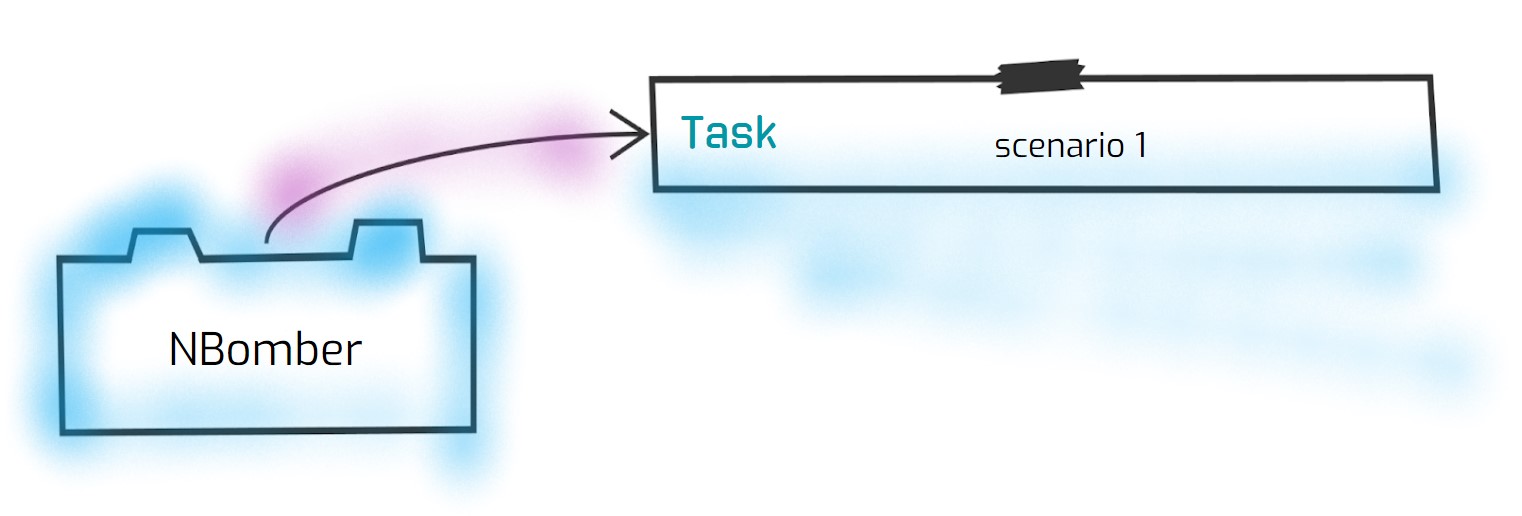
Scenario play the most crucial role in building load tests with NBomber. Scenario represents typical user behavior. In other words - it’s a workflow that virtual users will follow. Technically speaking, each Scenario instance works as a dedicated .NET Task.
Scenario Create
This method should be used to create Scenario.
public static ScenarioProps Create(string name, Func<IScenarioContext, Task<IResponse>> run)

public static ScenarioProps Create(string name, Func<IScenarioContext, Task> run)
The first overload returns a Response for each scenario iteration. The second overload does not return a Response. For more information, see Scenario without Response.
Imagine that you need to model a simple workflow where the user will do the following:
- Login
- Open home page
- Logout
And this is how it can be modeled using the Scenario.Create method:
var scenario = Scenario.Create("my e-commerce scenario", async context =>
{
    await Login();
    await OpenHomePage();
    await Logout();

    return Response.Ok();
});
Starting from NBomber v6.7.0, you can skip explicitly returning Response.Ok().
var scenario = Scenario.Create("my e-commerce scenario", async context =>
{
    await Login();
    await OpenHomePage();
    await Logout();
});
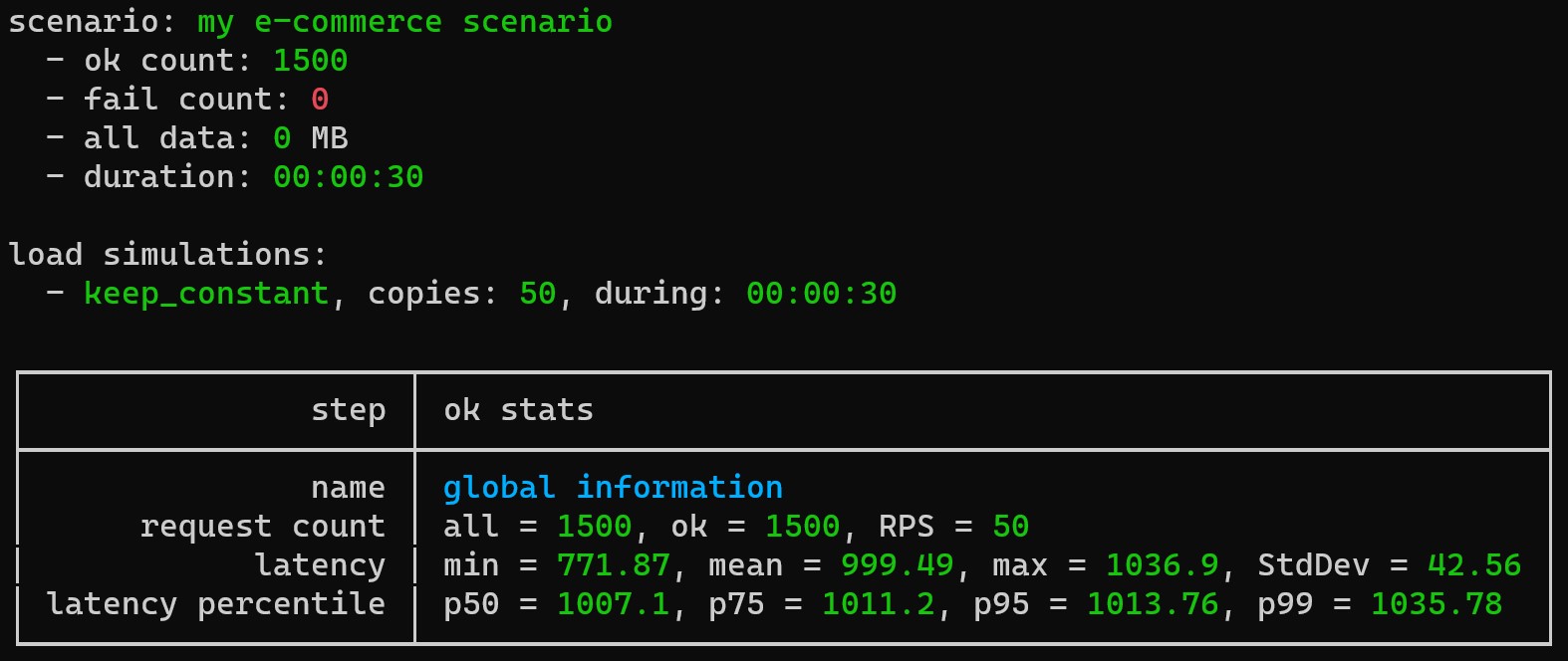
When you run this scenario, NBomber will measure the whole scenario execution. At the end of execution, NBomber will printout the scenario's statistics result:
Global Information - displays statistics for the whole scenario execution. To get measurements for each action (Login, Logout, etc.) separately, you must wrap the important user action into a Step. The Step helps you granulate your Scenario execution on parts and measure them separately.
Scenario Init
This method should be used to initialize Scenario and all its dependencies. You can use it to prepare your target system, populate the database, or read and apply the JSON configuration for your scenario.
Scenario init will be invoked before warm-up and bombing phases. If Scenario init throws an exception, the NBomber load test will stop the execution.
public ScenarioProps WithInit(Func<IScenarioInitContext, Task> initFunc)
Example:
var scenario = Scenario.Create("scenario_with_init", async context =>
{
    await Task.Delay(1_000);
    return Response.Ok();
})
.WithInit(context =>
{
    // You can do here any initialization logic: populate the database, etc.
    context.Logger.Information("MY INIT");
    return Task.CompletedTask;
});
You can find the complete example by this link.
One of the widespread use cases for scenario init is to fetch a global JWT token for the whole load test scenario.
var myGlobalJWT = "";

var scenario = Scenario.Create("scenario_with_init", async context =>
{
    await Task.Delay(1_000);
    return Response.Ok();
})
.WithInit(async context =>
{
    var client = Http.CreateDefaultClient();
    myGlobalJWT = await client.GetStringAsync("https://myhost/jwt");
});
Another widespread use case is to get and apply CustomSettings for the Scenario from the JSON configuration file. You can find the complete example by this link.
var scenario = Scenario.Create("scenario_with_init", async context =>
{
    await Task.Delay(1_000);
    return Response.Ok();
})
.WithInit(context =>
{
    var customSettings = context.CustomSettings.Get<CustomScenarioSettings>();

    context.Logger.Information(
        "test init received CustomSettings.TestField '{TestField}'",
        customSettings.TestField
    );
});
Scenario Clean
This method should be used to clean the scenario's resources after the test finishes.
Scenario clean will be invoked after warm-up and bombing phases. If Scenario clean throws an exception, the NBomber logs it and continues execution.
public ScenarioProps WithClean(Func<IScenarioInitContext, Task> cleanFunc)
Example:
var scenario = Scenario.Create("scenario_with_clean", async context =>
{
    await Task.Delay(1_000);
    return Response.Ok();
})
.WithClean(context =>
{
    // You can do here any cleaning logic: clearing the database, etc.
    context.Logger.Information("MY CLEAN");
    return Task.CompletedTask;
});
You can find the complete example by this link.
Scenario WarmUp
This method sets duration of warm-up phase. By default warm-up duration is 30 seconds.
public ScenarioProps WithWarmUpDuration(TimeSpan duration)
This method sets load simulations for the warm-up phase. By default, the warm-up phase uses the Scenario's LoadSimulations and stops after the warm-up duration. With this method, the warm-up phase uses its own load profile, separate from the main one.
public ScenarioProps WithWarmUpSimulations(params LoadSimulation[] warmUpSimulations)
This method disables warm-up.
public ScenarioProps WithoutWarmUp()
- If you set warm-up simulations, the warm-up phase runs them for their full planned duration.
- If you set warm-up simulations, NBomber ignores the warm-up duration. If you set both, NBomber logs a warning.
WithoutWarmUp()disables the warm-up phase and removes the warm-up simulations.- NBomber does not include warm-up results in the final report.
Example 1 (enable warm-up):
var scenario = Scenario.Create("scenario", async context =>
{
    await Task.Delay(1_000);
    return Response.Ok();
})
.WithWarmUpDuration(TimeSpan.FromMinutes(1));
Example 2 (disable warm-up):
var scenario = Scenario.Create("scenario", async context =>
{
    await Task.Delay(1_000);
    return Response.Ok();
})
.WithoutWarmUp();
Example 3 (custom warm-up simulations):
In this example, the main test runs at 500 requests per second. The warm-up phase increases the load slowly from 0 to 500 requests per second during 30 seconds. This keeps a cold system from getting the full load at once.
var scenario = Scenario.Create("scenario", async context =>
{
    await Task.Delay(1_000);
    return Response.Ok();
})
.WithWarmUpSimulations(
    Simulation.RampingInject(rate: 500, interval: TimeSpan.FromSeconds(1), during: TimeSpan.FromSeconds(30))
)
.WithLoadSimulations(
    Simulation.Inject(rate: 500, interval: TimeSpan.FromSeconds(1), during: TimeSpan.FromMinutes(5))
);
You can also set warm-up simulations in the JSON Config with the WarmUpSimulationsSettings field.
Scenario LoadSimulations
This method allows configuring the load simulations for the current Scenario. Load simulation allows configuring parallelism and workload profiles. To get more info please follow this link.
Default value is: Simulation.KeepConstant(copies: 1, during: TimeSpan.FromMinutes(1))
public ScenarioProps WithLoadSimulations(params LoadSimulation[] loadSimulations)
Example:
var scenario = Scenario.Create("hello_world_scenario", async context =>
{
    await Task.Delay(1_000);

    return Response.Ok();
})
.WithoutWarmUp()
.WithLoadSimulations(
    Simulation.RampingInject(rate: 50, interval: TimeSpan.FromSeconds(1), during: TimeSpan.FromMinutes(1)),
    Simulation.Inject(rate: 50, interval: TimeSpan.FromSeconds(1), during: TimeSpan.FromMinutes(1))
);
Scenario RestartIterationOnFail
This method allows enabling or disabling the reset of Scenario iteration in case of Step failure. The default value is true.
public ScenarioProps WithRestartIterationOnFail(bool shouldRestart)
By default, when a Step returns a failed Response or unhandled exception was thrown, NBomber will automatically mark the whole iteration as failed and restart it. The configuration value of RestartIterationOnFail should be set to false to change this behavior and prevent auto restart of Scenario iteration.
Sometimes, you would like to handle failed steps differently: retry, ignore or use a fallback. For such cases, you can disable scenario iteration restart.
Example: In this example, we will execute a Step, and when the response is finished with an error, we should retry it until it succeeds.
var scenario = Scenario.Create("scenario", async context =>
{
    var counter = 0;

    var step1Response = Response.Fail<string>();

    while (step1Response.IsError)
    {
        step1Response = await Step.Run("step_1", context, async () =>
        {
            counter += 1;
            await Task.Delay(1000);

            return counter == 3
                ? Response.Ok(payload: "ok response")
                : Response.Fail<string>();
        });
    }

    return Response.Ok();
})
.WithRestartIterationOnFail(shouldRestart: false); // by default it's true
Scenario MaxFailCount
This method overrides the default value of MaxFailCount for Scenario. By default the MaxFailCount = 5_000. MaxFailCount is incremented on every failure or failed Response. When a scenario reaches MaxFailCount, NBomber will stop the whole load test.
In the case of cluster mode, MaxFailCount is tracked per each NBomber instance exclusively. It doesn't aggregate across the cluster. So if on any NBomber node MaxFailCount is reached, NBomber will stop the whole load test.
public ScenarioProps WithMaxFailCount(int maxFailCount)
Usually, when a scenario gets too many errors, it does make sense to stop it earlier since continuing running produces more problems and often does not make much sense. Especially for this case, NBomber counts all scenario's failures, and if the counter reaches the MaxFailCount, NBomber will stop the test early.
Example:
var scenario = Scenario.Create("scenario", async context =>
{
    await Task.Delay(1_000);
    return Response.Ok();
})
.WithMaxFailCount(10);
You can also use JSON configuration to override this setting.
{
    "GlobalSettings": {

        "ScenariosSettings": [
            {
                "ScenarioName": "test_youtube",
                "WarmUpDuration": "00:00:02",

                "MaxFailCount": 500
            }
        ]

    }
}
Scenario StatsBasedOnIterations
This option controls how NBomber measures the Scenario stats. By default, if a Scenario contains Steps, NBomber builds the Scenario stats from all Step measurements. In this case, ScenarioStats represents the aggregated measurements of each Step in the Scenario. If you enable this option, NBomber builds the Scenario stats from the Scenario iteration measurements. In this case, ScenarioStats represents the measurements of the whole Scenario iteration.
public ScenarioProps WithStatsBasedOnIterations(bool enabled)
This option does not change StepStats. NBomber always reports each Step separately.
A Scenario without Steps has nothing to aggregate. For such a Scenario, NBomber always measures the stats per iteration, and this option changes nothing.
Example:
var scenario = Scenario.Create("scenario", async context =>
{
    await Step.Run("step_1", context, async () =>
    {
        await Task.Delay(1_000);
        return Response.Ok();
    });

    return Response.Ok();
})
.WithStatsBasedOnIterations(true);
You can also use JSON configuration to override this setting.
{
    "GlobalSettings": {

        "ScenariosSettings": [
            {
                "ScenarioName": "scenario",

                "StatsBasedOnIterations": true
            }
        ]

    }
}
Empty scenario
This method creates empty Scenario.
public ScenarioProps Empty(string name)
An empty Scenario is useful when you want to create the scenario to do only initialization or cleaning and execute it separately. The need for this can be when you have a few scenarios with the same init logic, and you want to run this init logic only once. Instead of using workarounds, you can separate the init logic into the dedicated scenario.
Example:
var initDbScn =
  Scenario
      .Empty("populate_database_scenario")
      .WithInit(async context =>
      {
          // here we can populate our DB
          await Task.Delay(5000);
      })
      .WithClean(async context =>
      {
          // here we can do a cleanup for our DB
          await Task.Delay(5000);
      });