Run Cluster via CLI Args
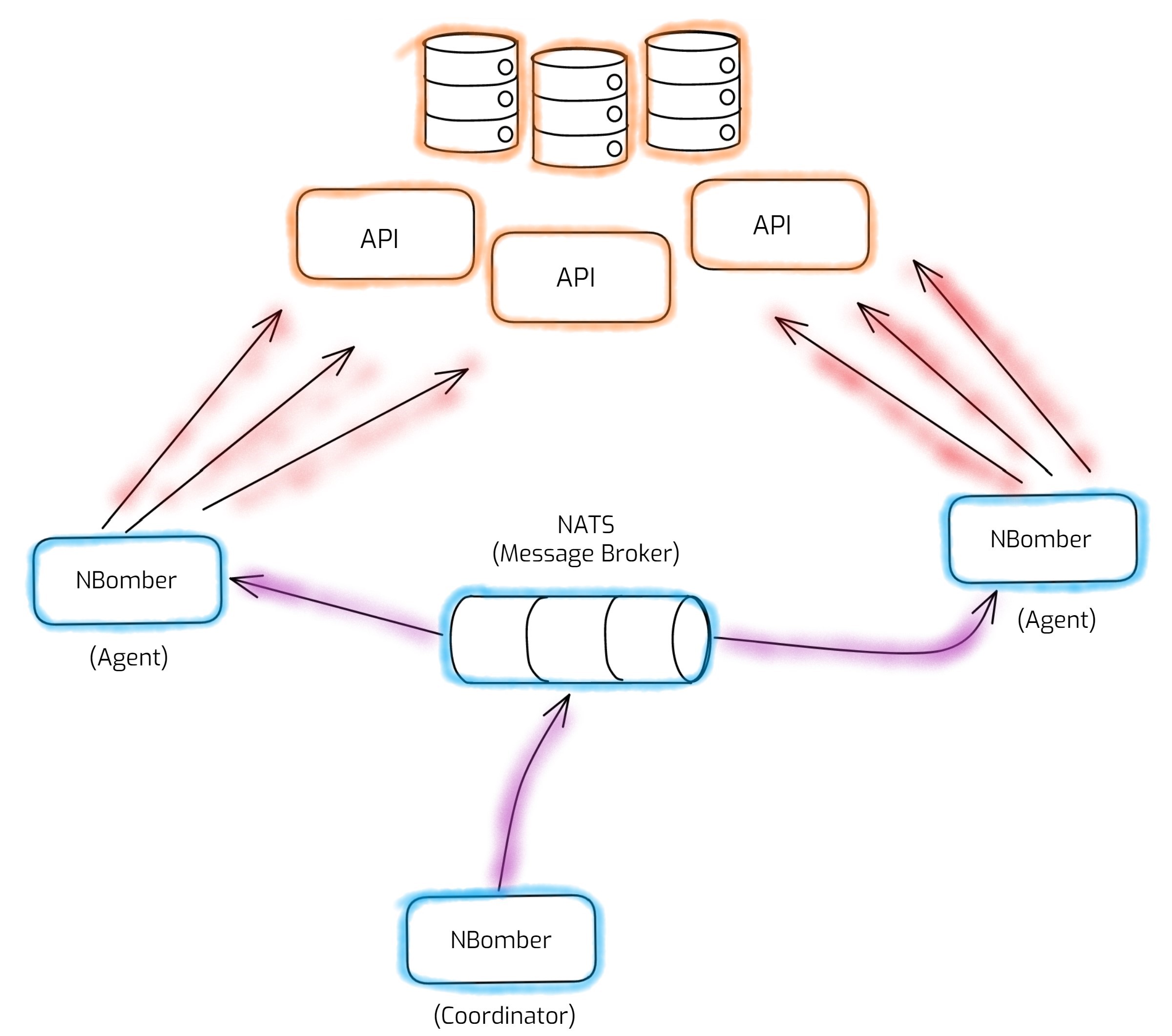
Before you start, make sure you're familiar with the basics of the NBomber API (Scenario, Step, NBomberRunner) and have the NATS message broker installed and running. New to cluster mode? See the Overview for the Coordinator, Agent, and Message Broker roles before continuing.
You can run NBomber Cluster without a license key. For details, see Local Dev Cluster.
The simplest way to set up and run an NBomber load test in cluster mode is by using CLI Args.
Make sure that NBomberRunner in your load test project accepts CLI Args.
static void Main(string[] args)
{
    var scenario = Scenario.Create("scenario", ...);

    NBomberRunner
        .RegisterScenario(scenario)
        .Run(args);
}
Let's run an NBomber load test in cluster mode across 3 nodes. We'll start a NATS message broker, then launch 3 instances of our load test app — they discover each other via NATS and run the test together.
For demo purposes, you can spin up 3 NBomber processes on the same node. In production, however, each NBomber process should run on a dedicated node (or Pod in K8s).
Note that you don't explicitly assign a role (Agent or Coordinator) to each NBomber process. Instead, NBomber Cluster uses leader election to automatically determine which process becomes the Coordinator and which ones act as Agents.
# to start NBomber process 1
dotnet my-nbomber-test.dll --cluster-id=default --cluster-agents-count=2 --cluster-nats-url=nats://localhost --license=YOUR_LICENSE_KEY

# to start NBomber process 2
dotnet my-nbomber-test.dll --cluster-id=default --cluster-agents-count=2 --cluster-nats-url=nats://localhost --license=YOUR_LICENSE_KEY

# to start NBomber process 3
dotnet my-nbomber-test.dll --cluster-id=default --cluster-agents-count=2 --cluster-nats-url=nats://localhost --license=YOUR_LICENSE_KEY
Here we spin up three NBomber processes and pass the required cluster arguments:
- --cluster-id - a virtual cluster id that cluster members use to discover each other. Usually
defaultis fine — it only needs to be unique per concurrent cluster session if multiple sessions share the same NATS instance. See Message Broker for details. - --cluster-agents-count - the number of Agents that must join the cluster (with the specified
cluster-id) before the test starts. In this case, the cluster will consist of 2 Agents. We don't specify the number of Coordinators since there is always exactly 1. So the total cluster size is 3 members: 1 Coordinator + 2 Agents. - --cluster-nats-url - the URL of the NATS message broker. In our example, we use
localhostsince we host NATS on the local machine usingdocker-compose. You can find more info about NATS connection strings here.
Cluster CLI args
These are the CLI args you will typically use to run a cluster. For the complete list of all NBomber CLI args, see CLI Arguments.
| Arg | Type | Required | Default | Description |
|---|---|---|---|---|
--cluster-id | string | yes | — | Virtual cluster id used by cluster members to discover each other. Only needs to be unique per concurrent session if sharing a NATS instance. |
--cluster-nats-url | string | yes | — | URL of the NATS message broker. |
--cluster-agents-count | int | no | 0 | Number of Agents that must join before the test starts. |
--target | string[] | no | all scenarios | Target scenarios to run (applies to both Coordinator and Agents). |
--cluster-coordinator-target | string[] | no | falls back to --target | Target scenarios to run only on the Coordinator. |
--cluster-agent-target | string[] | no | falls back to --target | Target scenarios to run only on the Agents. |
--cluster-local-dev | bool | no | false | Enables Local Dev Cluster (no license required). |
--license | string | no | — | License key, or a path to a file containing the key. |
Run Cluster without License Key
No license key? Add the --cluster-local-dev=true flag (and drop --license) to run via Local Dev Cluster. The example above then looks like this:
# to start NBomber process 1
dotnet my-nbomber-test.dll --cluster-local-dev=true --cluster-id=default --cluster-agents-count=2 --cluster-nats-url=nats://localhost

# to start NBomber process 2
dotnet my-nbomber-test.dll --cluster-local-dev=true --cluster-id=default --cluster-agents-count=2 --cluster-nats-url=nats://localhost

# to start NBomber process 3
dotnet my-nbomber-test.dll --cluster-local-dev=true --cluster-id=default --cluster-agents-count=2 --cluster-nats-url=nats://localhost
Set target scenarios
If you registered several scenarios but want to run only some of them, use --target. Without it, all registered scenarios run.
# to start NBomber process 1 (Agent)
dotnet my-nbomber-test.dll \
    --target=my_scenario \
    --cluster-id=default \
    --cluster-agents-count=1 \
    --cluster-nats-url=nats://localhost --license=YOUR_LICENSE_KEY

# to start NBomber process 2 (Coordinator)
dotnet my-nbomber-test.dll \
    --target=my_scenario \
    --cluster-id=default \
    --cluster-agents-count=1 \
    --cluster-nats-url=nats://localhost --license=YOUR_LICENSE_KEY
Multiple target scenarios
You can specify multiple scenarios via --target, it has type string[].
# to start NBomber process 1 (Agent)
dotnet my-nbomber-test.dll \
    --target=my_scenario,my_scenario_2 \
    --cluster-id=default \
    --cluster-agents-count=1 \
    --cluster-nats-url=nats://localhost --license=YOUR_LICENSE_KEY

# to start NBomber process 2 (Coordinator)
dotnet my-nbomber-test.dll \
    --target=my_scenario,my_scenario_2 \
    --cluster-id=default \
    --cluster-agents-count=1 \
    --cluster-nats-url=nats://localhost --license=YOUR_LICENSE_KEY
Running different target scenarios on Coordinator and Agents
If you want to run different scenarios on Coordinator and Agents, you can use --cluster-coordinator-target and --cluster-agent-target.
# to start NBomber process 1 (Agent)
dotnet my-nbomber-test.dll \
    --cluster-coordinator-target=my_scenario \
    --cluster-agent-target=my_scenario_2 \
    --cluster-id=default \
    --cluster-agents-count=1 \
    --cluster-nats-url=nats://localhost --license=YOUR_LICENSE_KEY

# to start NBomber process 2 (Coordinator)
dotnet my-nbomber-test.dll \
    --cluster-coordinator-target=my_scenario \
    --cluster-agent-target=my_scenario_2 \
    --cluster-id=default \
    --cluster-agents-count=1 \
    --cluster-nats-url=nats://localhost --license=YOUR_LICENSE_KEY
Running scenarios only on Agents
Keeping the Coordinator free of heavy scenarios is recommended — an idle Coordinator won't distort your load test results.
A common setup is to keep the Coordinator idle (acting purely as a test orchestrator) and run the load test scenarios only on the Agents. This prevents the Coordinator's work from distorting the load test results.
To do this, set the Coordinator's target scenarios to an empty list using the special [] value. The Coordinator will then run no scenarios, while the Agents run the load.
# to start NBomber process 1 (Agent)
dotnet my-nbomber-test.dll \
    --cluster-coordinator-target=[] \
    --cluster-agent-target=my_scenario \
    --cluster-id=default \
    --cluster-agents-count=1 \
    --cluster-nats-url=nats://localhost --license=YOUR_LICENSE_KEY

# to start NBomber process 2 (Coordinator)
dotnet my-nbomber-test.dll \
    --cluster-coordinator-target=[] \
    --cluster-agent-target=my_scenario \
    --cluster-id=default \
    --cluster-agents-count=1 \
    --cluster-nats-url=nats://localhost --license=YOUR_LICENSE_KEY
The [] value is a special token that means "run zero scenarios for this role". It works for --cluster-coordinator-target, --cluster-agent-target, and --target. In the example above, --cluster-coordinator-target=[] keeps the Coordinator free as an orchestrator, while --cluster-agent-target=my_scenario runs the load on the Agents.
What's next
Prefer to define cluster settings in a JSON file (and unlock advanced scenario placement across node groups)? See Run Cluster via JSON Config.