Why Performance fails in production
A system can look completely healthy before it encounters real users.
The automated tests pass. The code has been reviewed. Deployment finishes without errors. Everything appears ready for production. Then traffic increases and unexpected problems begin to surface: response times become unpredictable, database queries slow down, queues start growing, and the infrastructure takes too long to react.
This isn't necessarily a sign that the application was poorly built. Often, the problem is simpler: the system was never tested under realistic load.
Functional correctness isn't the same as performance
Most automated tests are designed to answer a fundamental question: Does the application produce the expected result?
That's important, but it's only one part of production readiness. A request that completes successfully in a test environment may behave very differently when hundreds or thousands of similar requests are executing simultaneously. CPU and memory become constrained, database connections are consumed, caches behave differently, network traffic increases, and dependencies may themselves start responding more slowly.
Performance is a system-level behavior
It is tempting to look for a single source of slow response times. Sometimes there is one, but application performance is usually the result of several components interacting with one another. A typical request might pass through application servers, a database, a cache, a message queue, external services, load balancers, and various layers of cloud infrastructure. Each component can introduce latency or become a bottleneck.
More importantly, the behavior of one component can change the behavior of another.
For example, a database that takes slightly longer to answer can cause application workers to remain occupied for longer. That can increase the request queue, which increases response time for subsequent users. Increased demand may then trigger additional infrastructure, but the extra capacity may arrive after the system has already accumulated a backlog. This kind of chain reaction is difficult to discover with isolated functional tests. The only reliable way to understand it is to deliberately expose the system to realistic workloads and observe what happens.
Production is an expensive testing environment
Finding a performance problem in production is possible, but it is rarely the ideal place to discover one.
A relatively small increase in latency can have a noticeable effect on user experience. For applications where users need to complete a purchase, submit a form, search for information, or perform another important action, additional waiting can lead to abandoned sessions. Industry research consistently shows that each additional second of page load time can reduce conversions by 5-10%.
Traffic spikes make the situation even more difficult. A bottleneck that remains invisible during normal usage can become critical when demand suddenly increases.
There are also operational costs that aren't visible in application metrics alone. A serious incident can involve engineers being pulled away from planned work, emergency infrastructure changes, incident coordination, and a backlog of fixes that may take considerable time to resolve.
Performance testing moves at least some of that discovery process before customers encounter the problem.
Performance testing shouldn't be a one-time event
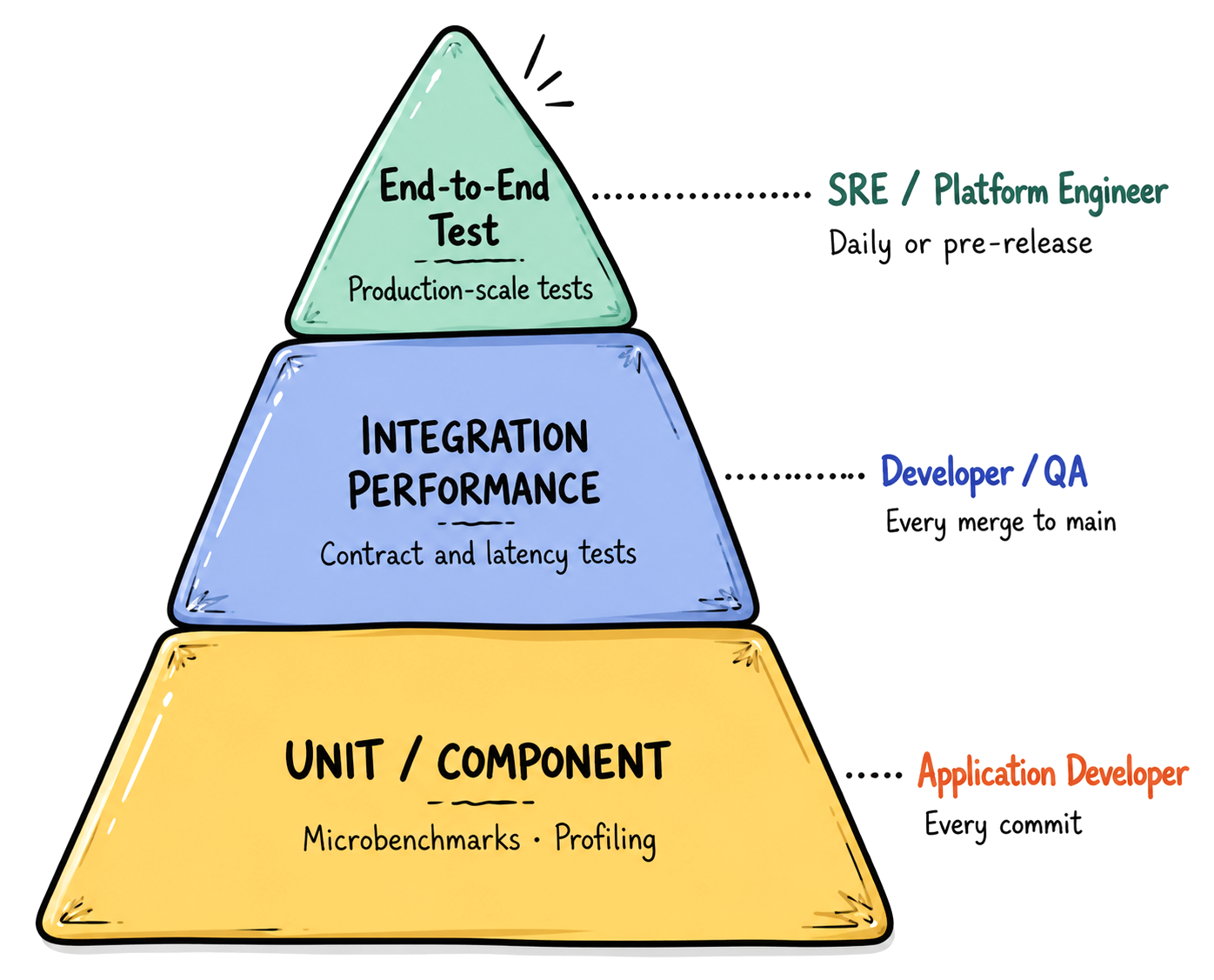
One common mistake is treating performance testing as something that happens immediately before launch. That approach is better than doing nothing, but modern applications change too frequently for a single pre-release test to provide lasting confidence. A more useful strategy is to make performance testing part of the development lifecycle.
Test early
Performance problems caused by architectural decisions are usually much cheaper to fix before an application is deeply developed. Testing an early version of the system can reveal issues such as inefficient data access, unsuitable caching strategies, poor concurrency handling, or infrastructure limitations while there is still time to change the design.
Test after important changes
New features, database migrations, dependency changes, infrastructure modifications, and architectural improvements can all affect performance. Running relevant tests after significant changes makes it easier to identify regressions while the cause is still fresh.
Test continuously
Production systems don't remain static. Traffic grows. Data volumes increase. New integrations are introduced. More features are added. User behavior changes. A performance profile that was accurate six months ago may no longer describe the current system. Regular testing provides a way to keep your understanding of the system's capacity up to date.
The goal is knowing your limits
The purpose of performance testing isn't simply to produce a report saying that an application survived a particular number of concurrent users. That number is useful, but it isn't the real objective.
The more valuable outcome is an understanding of how the system behaves as demand increases:
- When does response time begin to deteriorate?
- Which component becomes the bottleneck first?
- How does the system behave when traffic suddenly doubles?
- Does autoscaling react quickly enough?
- What happens when a dependency becomes slow?
- How much capacity is available before users start experiencing unacceptable latency?
- Can the system recover after a period of overload?
Those answers give an engineering team something much more useful than a simple pass/fail result: a model of the system's operating boundaries. And those boundaries should be revisited as the application evolves. Performance isn't something you verify once and then forget. It is a characteristic of a living system, influenced by its architecture, infrastructure, workload, and users. The earlier you measure it—and the more regularly you revisit those measurements—the fewer surprises you're likely to discover when real traffic arrives.